MCP in Ruby on Rails: Connect a Real Rails 7 App to AI Assistants
By Sandip Parida
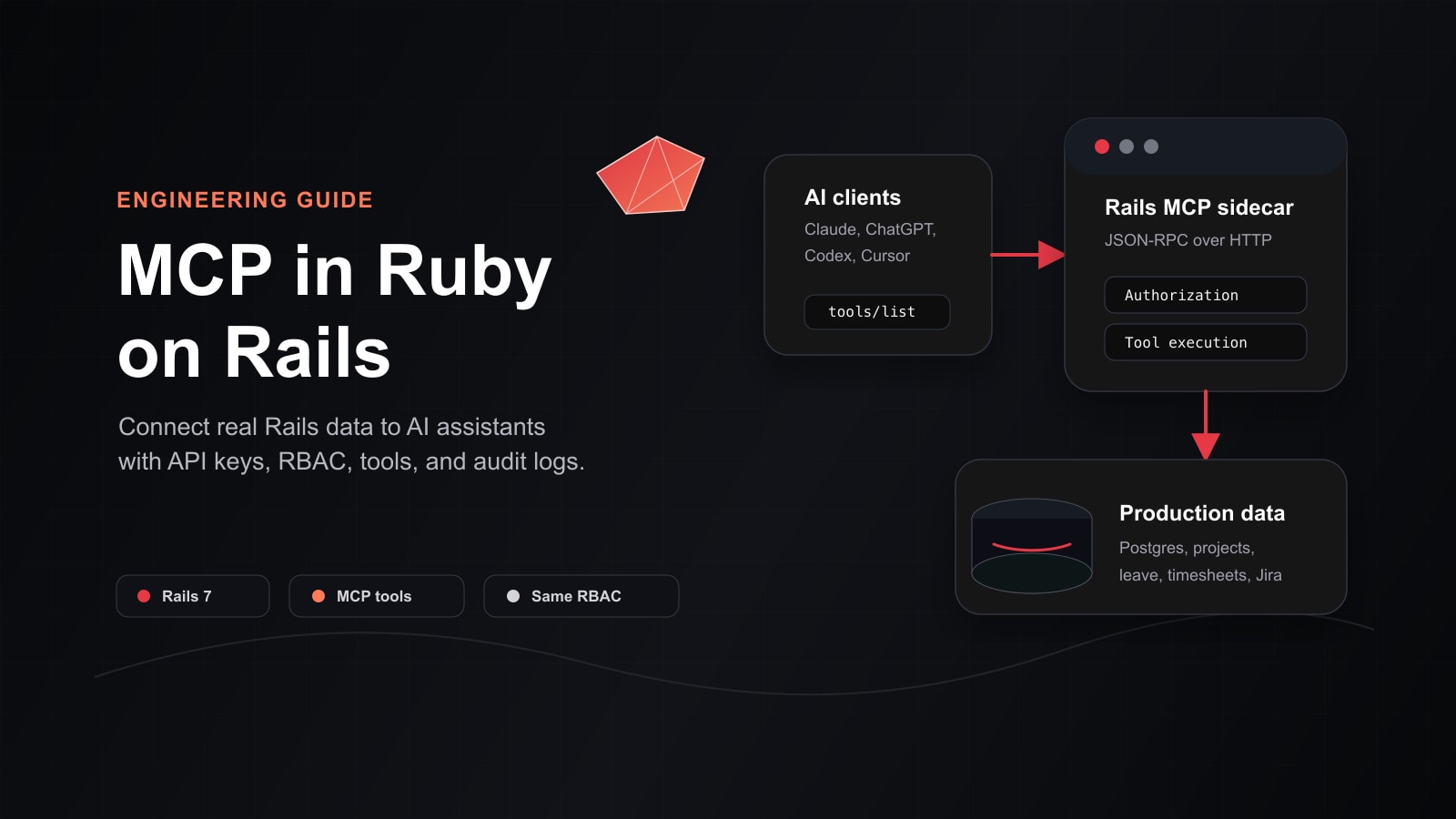
Most internal business apps already have the data an AI assistant needs. The problem is access.
In our case, the app was a Ruby on Rails 7 platform used for HR, project management, employee allocations, time tracking, leave management, and Jira sync. Managers could answer staffing questions from the web UI, but it took several screens. AI assistants could help, but only if someone copied data into chat, which is slow, stale, and risky.
So we added a Model Context Protocol (MCP) server directly inside the Rails application. Now an MCP-aware assistant can ask the Rails app for live data through approved tools, with the same permissions the user already has in the product.
The short version: we did not build a separate AI database. We exposed a thin, typed, auditable MCP surface over the Rails app we already trusted.
Quick answer: What does MCP do in a Rails app?
MCP lets a Rails application expose safe, named tools to AI assistants such as Claude, ChatGPT, Codex, Cursor, and other MCP clients. A tool might be get_available_employees, get_leave_calendar, search_issues, or create_issue.
The assistant does not scrape the UI and does not log in like a person. It sends a structured request to the MCP server. Rails authenticates the request, scopes the data to the current user, runs normal application code, and returns structured JSON.
Example user question:
Who on the platform team has spare capacity next sprint, knows Postgres, and is not on leave?
With MCP, the assistant can answer that from live Rails data, not from a copied screenshot or a stale export.
What is MCP, without the protocol jargon?
The official MCP documentation describes Model Context Protocol as an open-source standard for connecting AI applications to external systems such as databases, tools, and workflows. That is a good technical definition, but here is the practical one:
MCP is a standard way for an AI assistant to ask your application to do specific, permissioned things.
Think of it like a tool menu for AI:
get_employeeslists employees the user is allowed to see.get_available_employeesfinds people with spare capacity.get_project_teamreturns a project roster.search_issuessearches synced Jira issues.add_issue_commentwrites back to the issue tracker after policy checks.
Each tool has a name, a description, input rules, and a predictable output shape. The assistant reads that tool list, chooses the right tool, calls it, and uses the result to answer the user.
That matters because MCP is supported across a growing ecosystem. OpenAI documents remote MCP servers for ChatGPT apps, deep research, and API integrations. Claude Code also supports MCP servers for connecting to tools, databases, and APIs. The value is simple: build one good server, then reuse it across many assistant clients.
Useful official references:
- Model Context Protocol introduction
- Latest MCP specification
- OpenAI guide to building MCP servers
- Claude Code MCP documentation
Why we built an MCP server for Rails
The product already had the answers, but the workflow was too manual.
A project manager staffing a sprint might open Employees, Skills, Allocations, Leave Calendar, Projects, and Jira. Then they would mentally combine all of it:
- Who is available next week?
- Who has worked on Rails, Postgres, or React recently?
- Who is over-utilized?
- Who is on leave?
- Who is already attached to a critical project?
- Which Jira issues are blocking a delivery?
These are exactly the kinds of questions AI assistants are good at orchestrating. But without a proper integration, people were tempted to copy tables or screenshots into chat. That creates four problems:
- The assistant sees stale data.
- The assistant sees more data than it may need.
- The organization loses auditability.
- Sensitive internal information leaves the normal application path.
MCP gave us a cleaner route. The AI can ask the app. The app can say yes, no, or “only this scoped subset.”
The architecture: MCP as a Rails sidecar
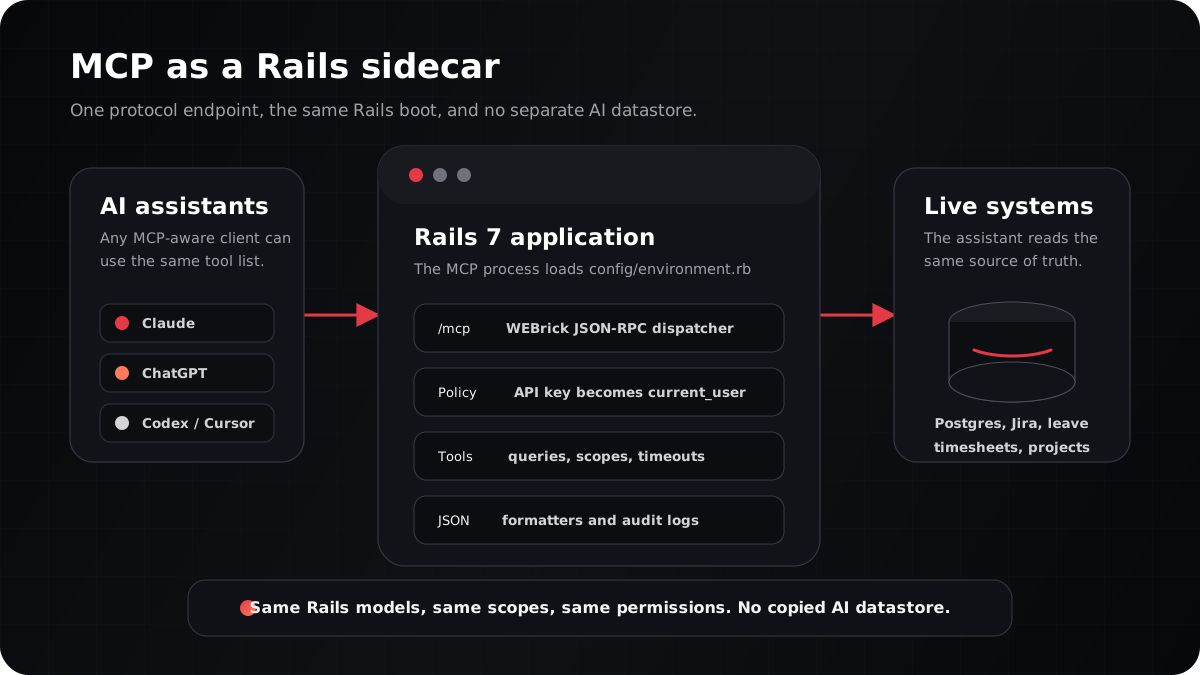
The most important decision was to make MCP a sidecar process inside the same Rails codebase.
It loads the same Rails environment:
# bin/mcp_server
require_relative '../config/environment'
require_relative '../app/mcp/server'

port = ENV['PORT']&.to_i || ENV['MCP_PORT']&.to_i || 3001
MCP::Server.new(port: port).start
That one line, require_relative '../config/environment', is the point. The MCP server uses the same models, scopes, initializers, services, and database connection as the web app.
Here is what is shared and what is MCP-specific:
| Shared with the Rails app | MCP-only |
|---|---|
ActiveRecord models like User, Project, Allocation, LeaveApplication | JSON-RPC server |
| Existing role helpers and business services | Bearer-token authentication |
| Production database and migrations | Tool definitions |
| Validations, model methods, and scopes | MCP response formatters |
| Audit and request context patterns | Per-tool authorization checks |
This keeps the AI integration close to the real product. When the model layer changes, MCP sees the same truth the dashboard sees.
The MCP folder structure
We kept the MCP code small and boring:
app/mcp/
├── server.rb
├── authorization.rb
├── formatters.rb
├── pagination.rb
└── tools/
    ├── get_employees.rb
    ├── search_employees.rb
    ├── get_employee_by_id.rb
    ├── get_projects.rb
    ├── get_project_team.rb
    ├── get_resource_utilization.rb
    ├── get_allocation_summary.rb
    ├── get_timesheet_data.rb
    ├── get_leave_calendar.rb
    ├── get_skills_inventory.rb
    ├── match_skills_to_project.rb
    ├── get_available_employees.rb
    ├── search_issues.rb
    ├── get_issue.rb
    ├── create_issue.rb
    ├── update_issue.rb
    └── add_issue_comment.rb
There are five moving parts:
- Server: receives JSON-RPC requests and dispatches them.
- Authentication: turns an API key into a Rails user.
- Authorization: decides which tools and records that user can access.
- Tools: expose real business capabilities to assistants.
- Formatters: turn ActiveRecord objects into stable JSON contracts.
The server: small WEBrick, clear JSON-RPC dispatch
MCP uses JSON-RPC. The Rails sidecar only needs to receive a request, inspect the method, and return the right envelope.
The server starts like this:
class Server
  PROTOCOL_VERSION = '2025-11-25'
  TOOL_TIMEOUT_SECONDS = 25
  UNAUTHORIZED_ERROR_CODE = -32001

  def initialize(port: 3001)
    @port = port
    @tools = {}
    load_tools
  end

  def start
    @server = WEBrick::HTTPServer.new(Port: @port)

    @server.mount_proc '/' do |_req, res|
      res.body = { status: 'ok', version: '1.0.0' }.to_json
    end

    @server.mount_proc '/mcp' do |req, res|
      handle_request(req, res)
    end

    @server.start
  end
end
The dispatch table is deliberately plain:
def dispatch(req)
  case req['method']
  when 'initialize'
    handshake_response(req)
  when 'tools/list'
    list_tools_response(req)
  when 'tools/call'
    call_tool(req)
  when 'notifications/initialized'
    ack_notification(req)
  else
    method_not_found(req)
  end
end
The useful work is not in the router. It is in the guardrails around the router: authentication, authorization, timeout handling, rate limiting, and audit logging.
Auto-loading tools from Rails
Adding a tool should feel like adding a small service object. Drop one file into app/mcp/tools, define a schema, define an execution path, and the server discovers it.
def load_tools
  Dir.glob("#{__dir__}/tools/*.rb").each { |file| require file }

  Tools.constants.each do |const|
    klass = Tools.const_get(const)
    next unless klass.is_a?(Class) && klass.respond_to?(:definition)

    tool_def = klass.definition
    @tools[tool_def[:name]] = klass
  end
end
That gave us a low-friction way to expand the server without creating a giant registry file.
Authentication: API keys, not browser sessions
Browser sessions are for humans in the web UI. MCP clients need bearer tokens.
We added a small ApiKey model. The plaintext key is shown once when the user creates it. After that, only the digest and a short prefix remain in the database.
class ApiKey < ApplicationRecord
  belongs_to :user

  TOKEN_PREFIX = 'sk_app_'

  def self.generate!(user:, name:)
    plaintext = "#{TOKEN_PREFIX}#{SecureRandom.urlsafe_base64(32)}"

    record = create!(
      user: user,
      name: name,
      token_digest: Digest::SHA256.hexdigest(plaintext),
      token_prefix: plaintext.first(12)
    )

    [record, plaintext]
  end
end
The MCP server authenticates every request:
def authenticate(req)
  header = req['Authorization'].to_s
  return nil unless header.start_with?('Bearer ')

  token = header.sub('Bearer ', '')
  digest = Digest::SHA256.hexdigest(token)

  ApiKey.active.find_by(token_digest: digest)
end
Once Rails finds the API key, api_key.user becomes current_user for the MCP call.
Authorization: the AI gets the same access as the user
This is the part to be strict about.
An AI assistant should not get a magical back door into your business data. If a normal employee cannot see salary data, the assistant acting for that employee cannot see salary data either. If a project manager can only see their project teams, the MCP server should return only those teams.
We implemented an MCP policy layer that mirrors the web app’s authorization model:
MCP::Authorization::Policy.allow?(
  tool: 'get_available_employees',
  user: current_user
)
And for record-level access:
employees = MCP::Authorization::Policy.scope(
  User.active,
  for_user: current_user,
  resource: :employees
)
The role scoping stays obvious:
def self.scope(relation, for_user:, resource:)
  return relation.none unless for_user

  case for_user.role.to_s
  when 'super_admin', 'admin'
    relation
  when 'project_manager'
    scope_for_pm(relation, for_user, resource)
  when 'employee'
    scope_for_employee(relation, for_user, resource)
  else
    relation.none
  end
end
The rule is simple: scope first, query second. Every tool starts with the user’s allowed relation, then filters within that set.
Tools: where AI capabilities become Rails code
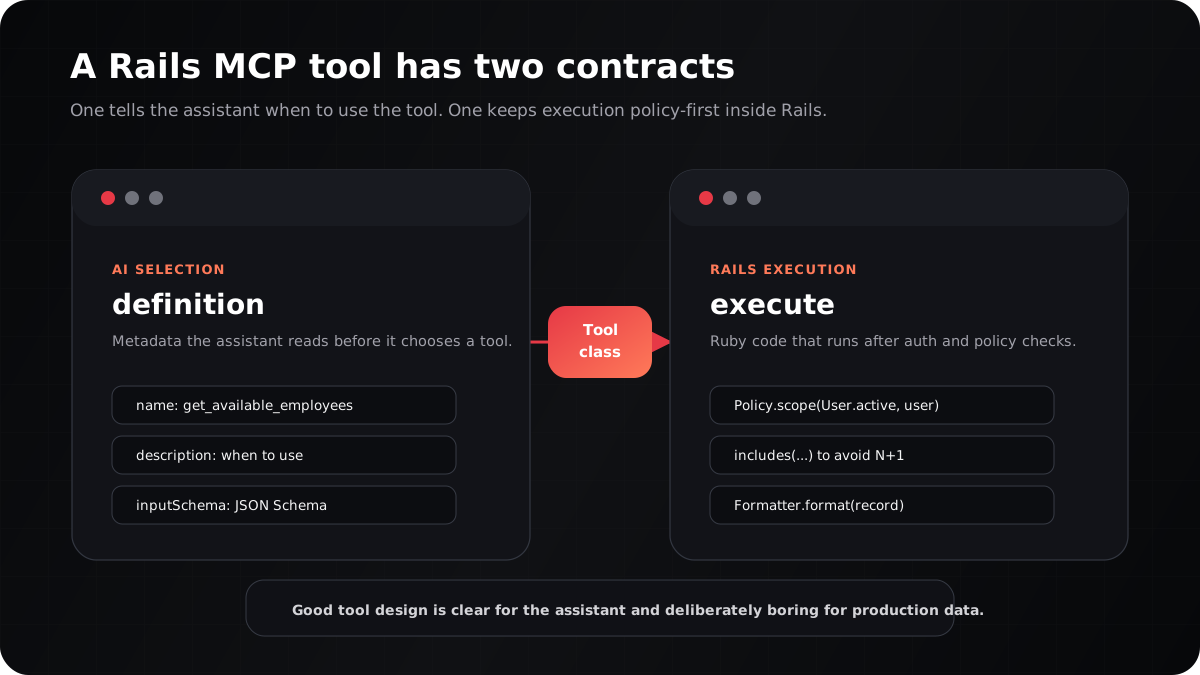
Each tool has two public methods: definition and execute.
The definition method is for the assistant. It explains what the tool does, when to use it, when not to use it, and what arguments are valid.
def self.definition
  {
    name: 'get_available_employees',
    description: <<~DESC.strip,
      Find employees with spare capacity for new work. Returns current
      utilization, free capacity, active projects, matching skills, and
      upcoming leave.

      When to use:
        - Staffing a new project or sprint
        - Checking bench capacity
        - Answering "who is free next week?"

      When NOT to use:
        - You want every employee: use get_employees
        - You want only skill matching: use match_skills_to_project
    DESC
    inputSchema: {
      type: 'object',
      properties: {
        min_free_capacity_percentage: { type: 'number' },
        skill: { type: 'string' },
        department: { type: 'string' },
        exclude_on_leave: { type: 'boolean' },
        sort_by: { type: 'string' }
      }
    }
  }
end
Those “When to use” and “When NOT to use” sections are not decoration. They help LLM clients choose the right tool for fuzzy user questions.
The execute method is for Rails:
def self.execute(params, context: nil)
  min_capacity = params['min_free_capacity_percentage']&.to_f || 30
  max_utilization = 100 - min_capacity

  employees = MCP::Authorization::Policy.scope(
    User.active.includes(
      :active_project_allocations,
      :employee_profile,
      :leave_applications
    ),
    for_user: context&.current_user,
    resource: :employees
  )

  available = employees.to_a.select do |employee|
    EmployeeFormatter.calculate_utilization(employee) <= max_utilization
  end

  available = filter_by_skill(available, params['skill'])
  available = exclude_currently_on_leave(available) unless params['exclude_on_leave'] == false

  available.map { |employee| format_employee(employee) }
end
Notice the shape:
- Start with an authorized relation.
- Eager load what the formatter needs.
- Filter inside the user’s allowed data.
- Return a stable response, not raw model JSON.
Formatters: protect the contract from model churn
Returning raw ActiveRecord JSON is tempting. It is also how you accidentally expose columns, break clients when a model changes, and create unpredictable responses.
We used formatters to define exactly what the assistant can see:
class EmployeeFormatter
  def self.preload_for_format(scope)
    scope.includes(:employee_profile, { active_project_allocations: :project })
  end

  def self.format(user)
    {
      id: user.id,
      name: "#{user.first_name} #{user.last_name}",
      email: user.email,
      department: format_department(user.employee_profile&.department),
      role: user.role,
      total_utilization_percentage: calculate_utilization(user),
      skills: format_skills(user),
      current_projects: format_current_projects(user),
      upcoming_leave: format_upcoming_leave(user)
    }
  end
end
We paired every formatter with preload_for_format. That one habit prevented most N+1 query problems before they reached production.
A full MCP request in practice
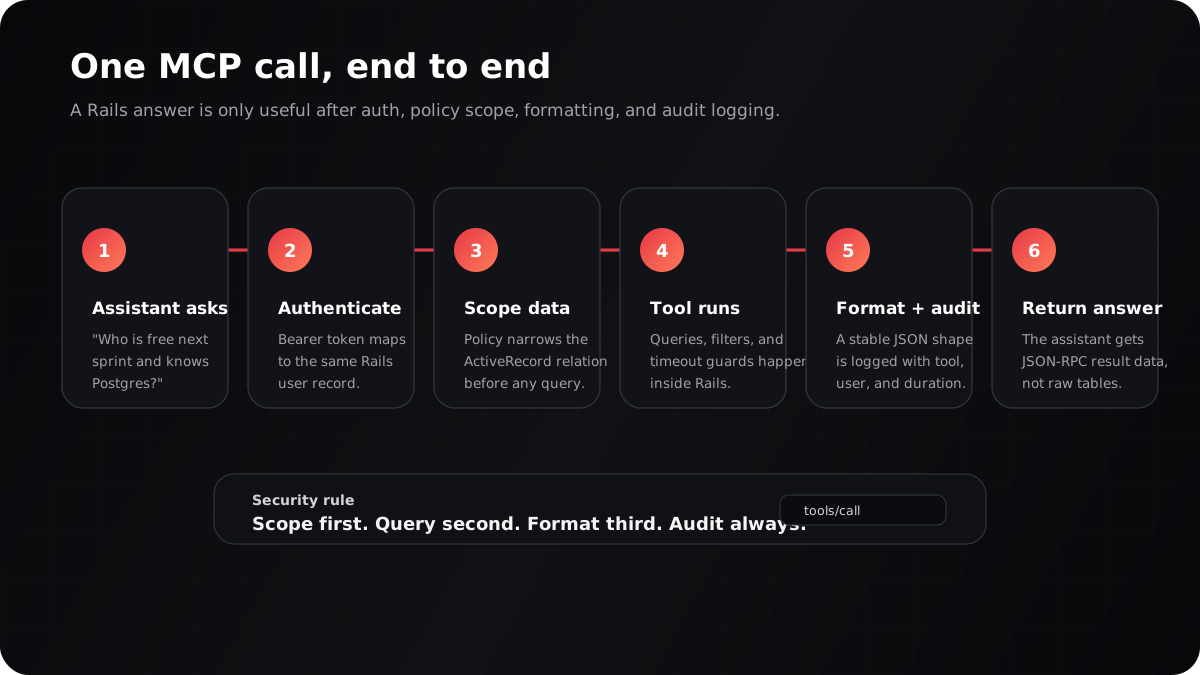
Here is the request flow for:
Find me a senior backend engineer free this week.
- The assistant reads the MCP tool list.
- It chooses
get_available_employees. - It calls
/mcpwithAuthorization: Bearer sk_app_.... - Rails hashes the token and finds the
ApiKey. - The API key resolves to
current_user. Policy.allow?checks whether the user can call the tool.Policy.scopenarrowsUser.activeto the records that user may see.- The tool filters by capacity, skills, department, and leave status.
- The formatter returns predictable JSON.
- The server logs user, tool, request ID, duration, and status.
- The assistant turns the JSON into a human answer.
The important security point: the assistant never receives “all employees” unless the authenticated user is allowed to see all employees.
What worked well
The best parts were practical:
- No separate AI data store. The assistant reads from the same Postgres-backed Rails models as the dashboard.
- One integration, many clients. A standards-based MCP server can serve multiple assistant clients instead of one custom adapter per tool.
- Permissions remain familiar. Admins, project managers, reporting managers, and employees keep the same visibility rules.
- Tools are easy to add. A new business capability is one file under
app/mcp/tools. - Audit logs are built in. We can see who called what, when, how long it took, and whether it succeeded.
- Copy-paste goes down. People can stop pasting internal screenshots into generic chat windows.
What was harder than expected
MCP itself was not the hard part. The hard part was making the integration production-safe.
1. Policy drift
If the web app uses Pundit and MCP uses a separate policy module, those two systems can drift. Treat every authorization change as a paired web and MCP change. Tests should prove that the assistant cannot see more than the UI.
2. N+1 queries in formatters
AI tools often ask for broad answers: “list all available employees with projects, skills, managers, and leave.” That can explode into hundreds of queries. Preload deliberately and benchmark the real tool responses.
3. Instance methods are not associations
Rails methods like primary_manager may look preloadable, but they are not associations. Preload the underlying association and calculate in memory when needed.
4. Slow tools need boundaries
Wrap tool execution in a timeout. A utilization rollup should not tie up the whole MCP server.
Timeout.timeout(TOOL_TIMEOUT_SECONDS) do
  tool_class.execute(arguments, context: context)
end
5. Write tools need more friction than read tools
Read tools can be carefully scoped. Write tools need confirmation paths, stricter policy checks, and clean audit records. We started with mostly read-heavy tools and added Jira write tools where the action was easy to explain and review.
Implementation checklist for adding MCP to Rails
Use this as a first-pass checklist:
- Create
bin/mcp_serverand bootconfig/environment.rb. - Add
app/mcp/server.rbfor JSON-RPC handling. - Add
app/mcp/tools/and make each tool a small class. - Add an
ApiKeymodel with digest storage, prefix display,last_used_at, andrevoked_at. - Show plaintext API keys once, then never again.
- Resolve every MCP call to
current_user. - Mirror your web authorization rules in an MCP policy layer.
- Scope ActiveRecord relations before filtering.
- Use formatters instead of raw model JSON.
- Add timeouts, rate limits, and audit logs before exposing the server to a team.
- Test with a real MCP client locally on a separate port such as
3001.
FAQ: MCP in Ruby on Rails
Is MCP an API replacement?
No. MCP is not a replacement for your public REST or GraphQL API. It is a tool interface for AI clients. The design goal is different: tools should be easy for an assistant to choose, safe to call, and clear in their output.
Can ChatGPT and Claude use the same Rails MCP server?
Yes, if the client supports the MCP transport and authentication setup you expose. That is the advantage of using the protocol instead of building one custom integration for every assistant.
Should an MCP server connect directly to the database?
For a Rails app, we prefer loading the Rails environment and using ActiveRecord. Direct database access bypasses model logic, scopes, validations, and business rules. The sidecar approach keeps the assistant on the same path as the product.
How do you stop the AI from seeing too much data?
Do not rely on the assistant to behave. Enforce access in Rails. Resolve the API key to a user, check whether that user can call the tool, and scope every query before returning data.
What tools should you build first?
Start with read-only tools that answer high-value, low-risk questions: availability, project roster, leave calendar, utilization, skills inventory, and issue search. Add write tools only after audit logging and approval flows are solid.
Closing thought
The exciting part of MCP is not that it makes Rails feel futuristic. It is that it lets a mature Rails app become useful to AI assistants without rewriting the product.
You keep the same database, the same models, the same roles, and the same business rules. You add a narrow protocol layer that speaks in tools instead of pages. The assistant gets live context, the user gets faster answers, and the application remains the source of truth.
That is the version of AI integration we trust: useful, inspectable, and built on the systems the team already understands.